Guides › Amazon invite alerts
How to use Alexa for Shopping to watch for Amazon Pokémon invitations
Amazon sells some high-demand Pokémon cards by invitation: you request one on the product page, and Amazon decides who can buy (how the stores compare, checked October 5, 2026). Alexa for Shopping, Amazon's shopping assistant, can watch for these for you. On October 20, 2026, we set one up, and it showed a daily check for Pokémon TCG products sold directly by Amazon. Here's where to find it, what to say, and what it can't do.
In short
- Open Alexa for Shopping and ask. In the Amazon Shopping app, tap the Alexa icon in the bottom bar; on a computer, it's at the top of the screen (Amazon).
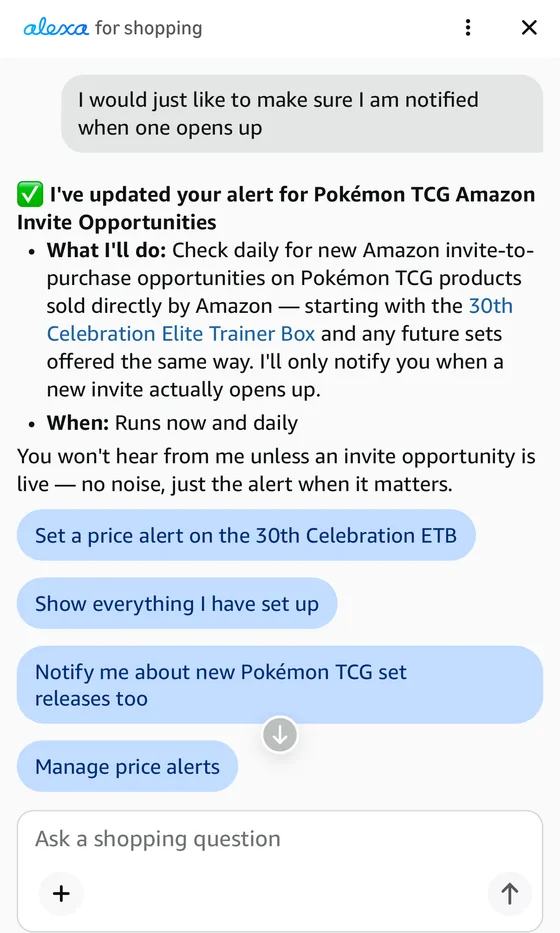
- What we saw on October 20, 2026: a daily check for new invite-to-purchase opportunities on Pokémon TCG products sold directly by Amazon, with a notification only when a new invite opens.
- It works. On October 21, 2026, it sent an email, "Update: 30th Celebration ETB price drop", saying the box was $59.99 on Amazon, sold directly by Amazon, with the invite queue still active. The MSRP is $49.99, so that's above it.
- It alerts even if you've already asked. That email went to an account that had already requested this invite, so an alert doesn't always mean a new chance.
- It's a daily check, not a live one. An invitation can open and close between checks, and you still have to request one and be selected.
- Check you're paying MSRP. As of October 20, 2026, there are reports of Amazon's price changing in the cart after the item is added. On the last checkout page, compare the price with the MSRP before you pay.
- Pair it with email alerts. Our free email alerts cover invitation lists at other stores too.
Covers
Where to find Alexa for Shopping, what to type, how to check what it set up, and what we could and couldn't confirm as of October 21, 2026.
Doesn't cover
How Amazon's invitations work once one opens; how the stores compare covers that.
How to set it up
- 1Open Alexa for Shopping. In the Amazon Shopping app, tap the Alexa icon in the bottom navigation bar. On a computer, it's at the top of the screen. Amazon says all U.S. Amazon customers have access to it (Amazon; the page is undated). We used the Amazon website in a phone browser, where it showed as a panel called "alexa for shopping".
- 2Ask in plain language, for example "Notify me when a new Amazon invite opens for Pokémon TCG products." In our screenshot the request was a follow-up: "I would just like to make sure I am notified when one opens up." Alexa answered that it had updated "your alert for Pokémon TCG Amazon Invite Opportunities". Your wording doesn't need to be exact, but name the product type, as in "Pokémon TCG".
- 3Read what it says it will do. Ours said it would "Check daily for new Amazon invite-to-purchase opportunities", on Pokémon TCG products sold directly by Amazon, starting with the 30th Celebration Elite Trainer Box and any future sets offered the same way, and would notify us only when a new invite opens. It added: "Runs now and daily".
- 4Check and manage it. The panel showed buttons for "Show everything I have set up" and "Manage price alerts". Use those to see the alert again. We haven't confirmed how to turn it off, and Amazon's page doesn't say; start with those buttons, or ask Alexa.
- 5Allow notifications for the Amazon app. Amazon says Alexa will "send you a personalized notification" for its release alerts; it doesn't say how that arrives for invitations. Turning the app's notifications on makes it more likely you'll see one.
- 6Check you're paying MSRP before you pay. As of October 20, 2026, there are reports of Amazon's price changing in the cart after the item is added. On the last checkout page, compare the price with the MSRP (the 30th Celebration Elite Trainer Box is $49.99, PHD Games) and remove the item if it's higher.
What it can't do
- It checks daily. The panel said "Runs now and daily". We don't know how long an Amazon invitation stays open, so a daily check can miss a short one. Alexa said it would notify us; it didn't say it would request the invite for us.
- You still have to be selected. A notification means a chance to request, not a reserved box; Amazon's own steps are in how Pokémon Center invitations work, which compares Amazon's.
- Only products sold directly by Amazon. That's what Alexa said it would watch. Marketplace sellers are a different thing.
- Its updates carry prices, and they can disagree. The October 21 email said the box was "down from $159.99", while the price shown under it was struck through from $89.99. Go by the price on the last checkout page, and compare it with the MSRP.
What we don't know yet
As of October 20, 2026, Amazon's page we could read describes Alexa for Shopping's price alerts and "Update me when" release alerts, but doesn't mention invitations, and we couldn't load Amazon's help pages (they returned an error). So we can't say:
- Which games it covers. We only set up a Pokémon alert. Ask Alexa about other games; we haven't seen Amazon say it works for them.
- Every way it notifies you, or whether every account gets the invite alert. For one account, the October 21 update arrived by email; we don't know if it also comes as an app notification.
- How to turn it off, beyond the buttons above.
Use it with our alerts
A daily Amazon check and our free email alerts do different jobs. Ours cover invitation lists at stores such as Best Buy, drawings, Pokémon Center waiting rooms and pre-orders; we may not catch every Amazon invitation, which is where Alexa's check helps. Getting the most out of free alerts covers the accounts and phone settings to set up first.
Sources and notes
How we checked this
How we checked this: the Alexa wording is from the Alexa for Shopping panel on amazon.com as we saw it on October 20, 2026, and from Alexa for Shopping's update email of October 21, 2026. Where to find it and who has access are from Amazon's own announcement page (undated). Amazon's help pages returned an error when we tried, so nothing here comes from them. The reports of cart price changes are as of October 20, 2026; we haven't confirmed them ourselves. Amazon changes this feature without notice.